

Choosing warehouse management software can look simple at first.
Most systems claim to support receiving, inventory, picking, and shipping. On a feature comparison sheet, they often look very similar.
The differences usually appear after people start using them.
Can warehouse workers receive goods directly on a handheld device? Can they find the correct bin without asking an experienced employee? Does inventory update immediately after picking? What happens when the physical quantity does not match the system? Can the WMS exchange orders with the ERP without someone entering the same information twice?
These are the questions that matter in daily warehouse operations.
This guide explains how to evaluate warehouse management software around the actual movement of goods—from inbound receiving and putaway to picking, shipping, inventory counting, and system integration.
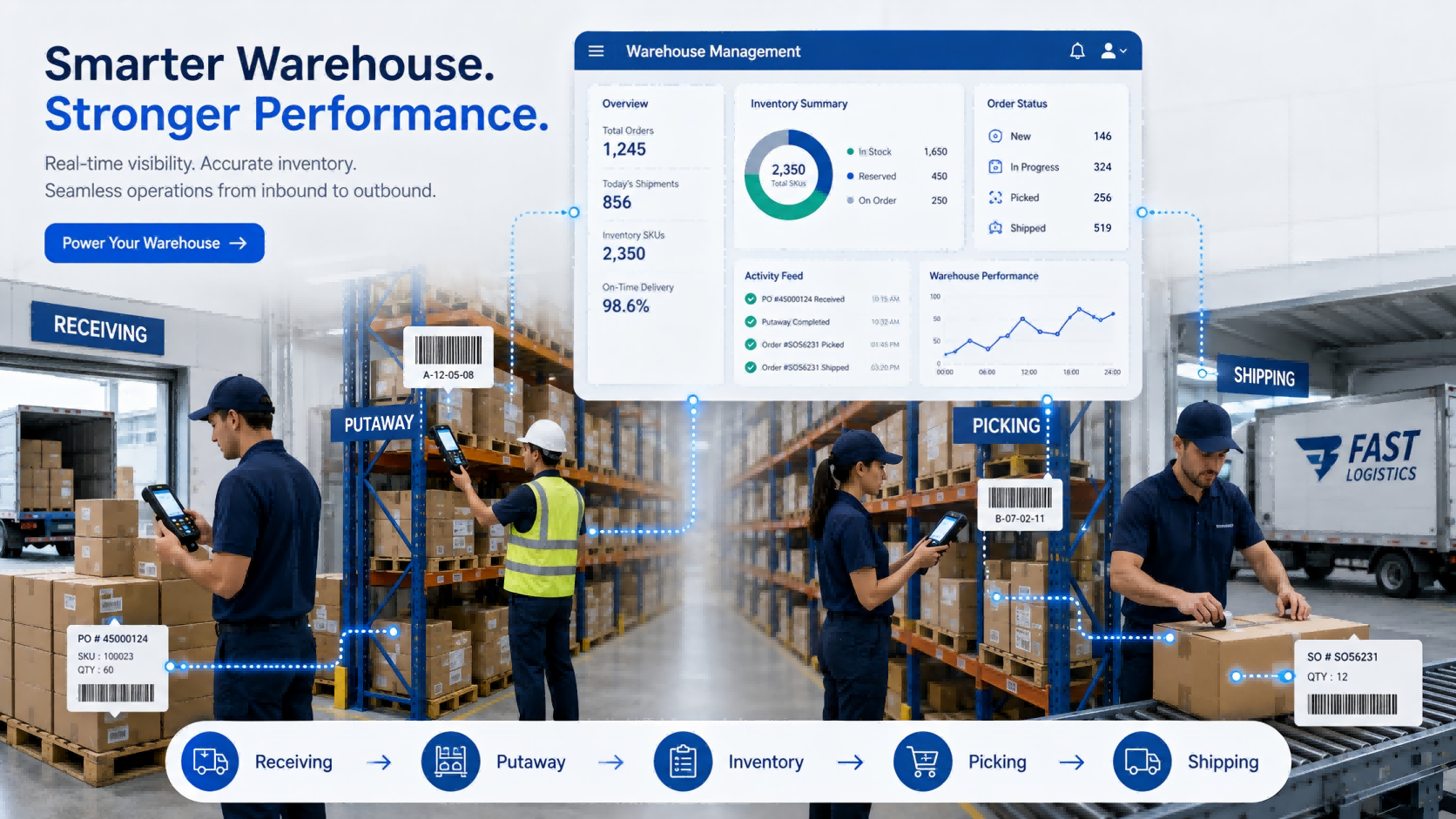
A suitable warehouse management system should match three things:
Your warehouse process
How goods are received, stored, picked, shipped, and counted.
Your operating volume
SKU quantity, daily orders, warehouse locations, workers, and inventory frequency.
Your required level of automation
Manual entry, barcode scanning, handheld PDA, RFID, or automatic identification.
For many small and medium warehouses, a practical starting point can be:
WMS + Barcode + Handheld PDA + Printer
RFID or more advanced automation can be introduced where the workload justifies it.
The goal is not to buy the WMS with the most functions.
It is to reduce the manual steps that are creating errors, delays, or poor inventory visibility today.
Before watching a WMS demonstration, walk through one real inbound order and one real outbound order.
For inbound:
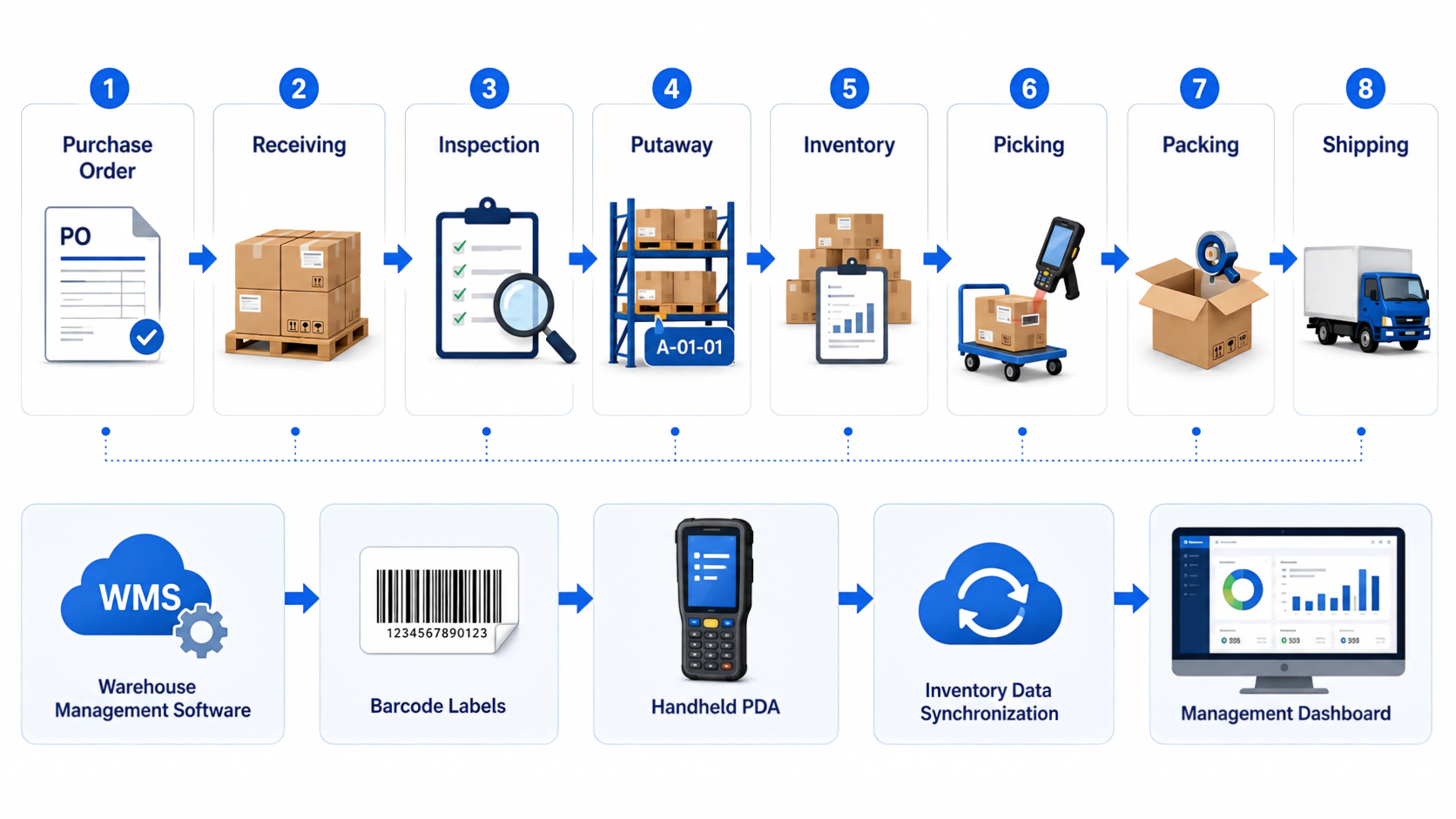
Purchase Order → Receiving → Inspection → Putaway → Inventory Update
For outbound:
Sales Order → Picking → Verification → Packing → Shipping → Inventory Deduction
Then identify where employees still depend on:
Those points should become your WMS requirements.
Imagine a warehouse receives 50 cartons.
The operator checks the purchase order on a computer, writes the received quantity on paper, moves the cartons to a rack, and someone updates Excel later.
There are already several places where the physical inventory and digital record can become different.
A better workflow might be:
Open Receiving Task → Scan Product → Confirm Quantity → Scan Bin → Complete Putaway
The transaction is recorded while the warehouse worker is doing the work.
That difference matters more than another ten dashboard charts.
One thing we often notice during early project discussions is that customers describe the problem as:
“Our inventory is inaccurate.”
Once the process is mapped, the problem often starts earlier.
Goods may have been received without verification, moved without recording the new location, or shipped before the transaction was confirmed.
Inventory accuracy is usually the result of the entire workflow—not an isolated software function.
Inbound is where the inventory record begins.
If the wrong quantity enters the system, everything afterward becomes harder.
Depending on the business, receiving may need to capture:
Not every warehouse needs every field.
A hardware distributor may care more about model and serial number. A food warehouse may care more about batch and expiry dates. A manufacturing warehouse may need material batches and production traceability.
That is why generic feature lists can be misleading.
Instead of asking:
“Do you support inbound management?”
Give the supplier a real exception:
“One purchase order contains 20 SKUs. Two arrive short, one batch fails inspection, and the remaining goods need to be stored in three locations. Show us how the system handles it.”
A live workflow usually tells you more than a Yes/No feature table.
A warehouse can have the correct stock quantity and still waste time looking for goods.
That usually happens when location management is weak.
A practical WMS should connect inventory with physical locations such as:
Warehouse → Zone → Rack → Shelf → Bin
For many operations, the process can stay simple:
Scan Item → Scan Bin → Confirm Putaway
During picking:
Open Task → Go to Bin → Scan Item → Confirm Quantity
This reduces dependence on experienced employees who simply “know where everything is.”
Large or complex warehouses may benefit from rules based on product category, capacity, picking frequency, or storage restrictions.
Smaller warehouses may not.
If your current problem is simply that goods are frequently placed in the wrong location or cannot be found quickly, solve that first.
Complexity should follow the business need.
A WMS can have excellent software functions, but if warehouse employees still need to return to a desktop after every task, much of the manual gap remains.
Ask where each transaction should happen.
Usually suitable for:
A handheld PDA can support:
The transaction is recorded while the operator is physically handling the goods.
That reduces the gap between:
What happened in the warehouse
and
What the system says happened.
For many warehouse projects, we do not start by asking how many handheld devices the customer wants.
We first look at:
Only then does it make sense to determine the hardware quantity.
Buying devices before mapping the workflow can leave some units unused while other operators still wait for equipment.
RFID can improve warehouse automation, but it should not automatically be the starting point for every project.
For many operations, barcode remains practical.
A typical process is:
Scan Product → Scan Location → Confirm Quantity
A better question than:
“Should we use barcode or RFID?”
is:
“Which warehouse process has become too slow for one-by-one scanning?”
That usually makes the decision much clearer.
A WMS that supports both also gives the business room to start with barcode and introduce RFID later in selected processes.
Inbound errors affect inventory accuracy.
Outbound errors reach the customer.
That makes picking one of the most important workflows to test.
A warehouse worker should be able to see:
What to pick
Where to pick it
How much to pick
The system should then verify what actually leaves the warehouse.
A practical outbound process may look like:
Sales Order
↓
Picking Task
↓
Bin Location
↓
Product Verification
↓
Quantity Confirmation
↓
Packing
↓
Shipping Confirmation
Higher-volume operations may also need:
Do not select these functions simply because they sound advanced. Select them because the order volume requires them.
In one warehouse management project in Thailand, the operation handled around 500 orders per day and approximately 3,000 SKUs.
Before the new system was introduced, inventory accuracy was around 92%, picking errors were about 3%, and paper-based picking meant warehouse employees spent considerable time walking between locations.
The project introduced digital inventory management, replenishment alerts, ABC inventory management, multi-warehouse control, and wave picking.
After implementation:
The result did not come from one individual software feature.
Inventory records, storage locations, picking tasks, and daily warehouse operations were connected into the same workflow.
This is why we recommend comparing WMS systems by process rather than by feature quantity.
Once inbound and outbound workflows are clear, evaluate the inventory rules that affect daily operations.
| Requirement | When It Matters |
| Bin Location Management | Workers need to know exactly where goods are stored |
| Batch / Lot Management | Products require traceability |
| Expiry Management | Goods have shelf-life requirements |
| FIFO / FEFO | Goods must leave in a defined sequence |
| Multi-Warehouse Management | Inventory is distributed across locations |
| Cycle Counting | Selected stock needs regular verification |
| Replenishment Alerts | Stock availability affects orders or production |
You may not need all of them.
Ask:“Which inventory rules affect our actual warehouse decisions every day?”
That keeps the first deployment easier to manage.
Another project involved a machinery-related business that needed to manage both fixed assets and spare-parts inventory.
This type of operation creates a different challenge from a conventional finished-goods warehouse.
Some items are long-term equipment assets. Others are spare parts that are repeatedly received, stored, issued, and replenished.
Treating everything as the same type of inventory makes records difficult to manage.
The project therefore required the management process to distinguish between different item types while still giving users a clearer view of what was available and where it was located.
The lesson is useful when choosing a WMS:
Do not assume every item in the warehouse follows the same lifecycle.
Before selecting software, identify whether you are managing finished goods, raw materials, spare parts, tools, consumables, equipment—or a combination of them.
That classification can affect the software structure far more than buyers initially expect.
These two topics often appear late in software discussions, but they can change the project significantly.
If an ERP already manages purchasing, sales, finance, or product master data, decide which system owns each transaction.
A typical flow may be:
ERP Purchase Order
→ WMS Receiving
→ WMS Inventory
→ ERP Synchronization
For outbound:
ERP Sales Order
→ WMS Picking & Shipping
→ Shipment Confirmation
→ ERP Update
Ask early:
Without clear ownership, employees may end up entering the same transaction in both systems.
SaaS may make sense when the business wants faster rollout, remote access, multi-site use, and lower local IT requirements.
Local deployment may be required when the warehouse operates inside a controlled network or company policy requires data to remain on internal servers.
Ask practical questions:
The answers matter more than whether the product is labeled “cloud” or “on-premise.”
After several demonstrations, most WMS feature lists begin to look the same.
A better method is to give every supplier the same warehouse scenarios.
A purchase order contains 10 SKUs.
One arrives short.
One needs inspection.
The remaining goods go to several locations.
Show the complete workflow.
A customer order contains 15 SKUs.
One picking location does not have enough stock.
Show how the system handles picking, shortage, verification, and shipment.
The physical quantity differs from the system.
Show:
Count → Difference → Review → Approval → Adjustment
Now you are comparing how systems handle your actual work—not presentation slides.
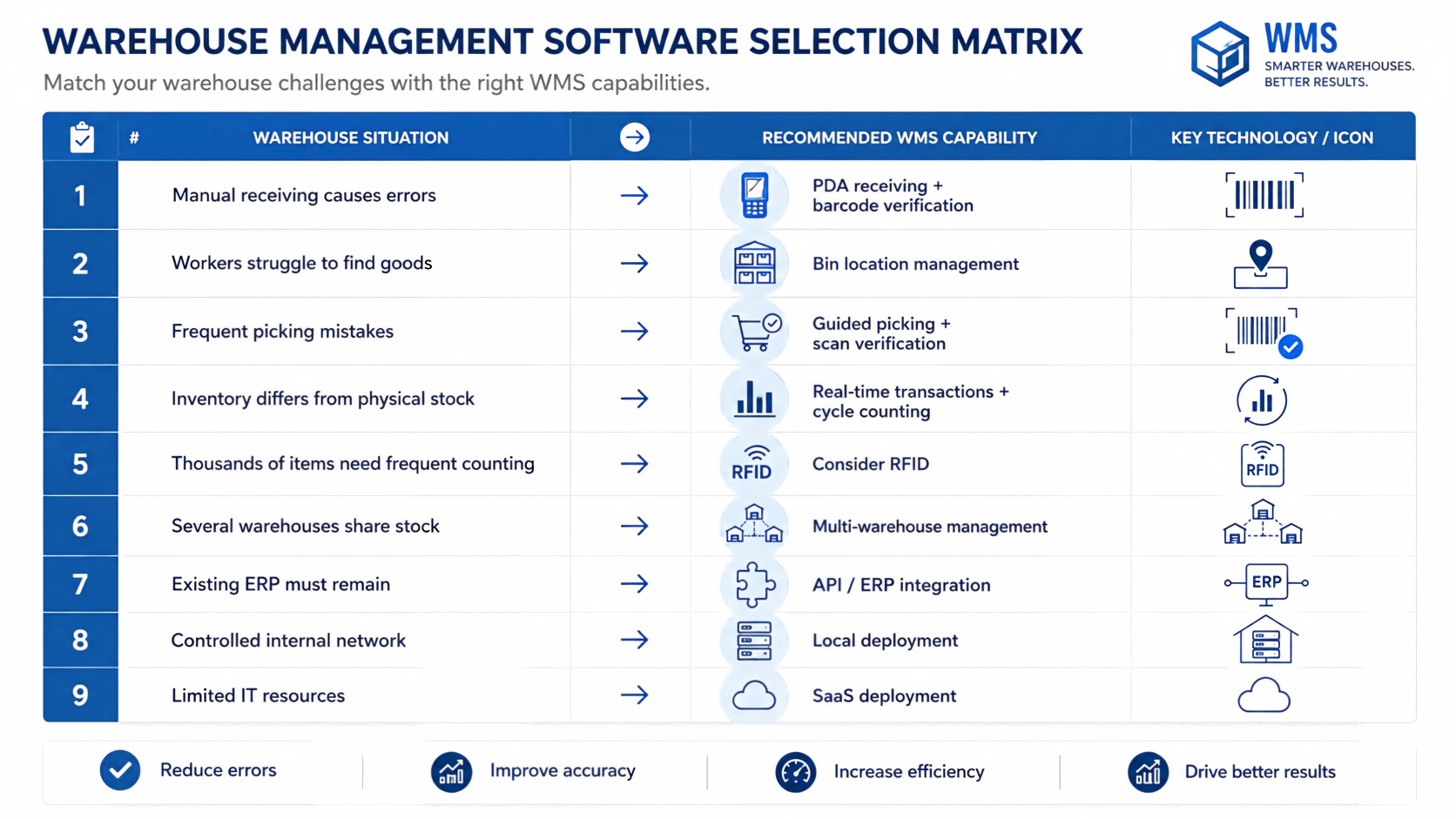
| Your Situation | Capability to Prioritize |
| Manual receiving causes errors | PDA receiving + barcode verification |
| Workers struggle to find goods | Bin location management |
| Frequent picking mistakes | Guided picking + scan verification |
| Inventory differs from physical stock | Real-time transactions + cycle counting |
| Thousands of items need frequent counting | Consider RFID |
| Several warehouses share stock | Multi-warehouse management |
| Batch-sensitive products | Batch/lot + FIFO/FEFO |
| Existing ERP must remain | API / ERP integration |
| Limited internal IT resources | Consider SaaS |
| Controlled internal network | Evaluate local deployment |
This is a starting point, not a universal configuration.
Before signing a contract, ask:
If the answer is only:
“Yes, we support it.”
ask for a live demonstration.
For many small and medium warehouses, the first-stage configuration may simply be:
Warehouse Management Software
This can already cover:
Receiving → Putaway → Inventory → Picking → Shipping → Stock Counting
Additional technologies can be introduced later.
RFID
when bulk identification becomes valuable.
when inbound or outbound identification needs more automation.
Multi-Warehouse Functions
when operations expand.
ERP Integration
when duplicate data entry becomes a problem.
The WMS should be able to grow with the operation without forcing unnecessary complexity into the first deployment.
FYJ combines warehouse management software with barcode, RFID, and mobile data collection hardware.
Depending on the warehouse process, a project may include:
Our starting point is normally the workflow.
Once those questions are clear, it becomes easier to determine which software functions and hardware are actually required.
The objective is not to digitize every possible warehouse process.
It is to improve the processes where identification, workflow control, and real-time data can make a practical difference.
What should I look for when choosing warehouse management software?
Start with receiving, putaway, location management, picking, shipping, and inventory counting. Then evaluate PDA support, barcode or RFID requirements, integration, multi-warehouse management, and deployment method.
What is the best WMS for a small warehouse?
A smaller warehouse usually benefits more from a simple system covering core inbound, outbound, location, and inventory processes than from a complex platform with many unused functions.
Does a WMS need handheld PDA support?
If employees perform transactions while receiving, storing, picking, or counting goods, handheld support can reduce delayed and duplicate data entry.
Should a warehouse use barcode or RFID?
Barcode is often sufficient for one-by-one identification and standard warehouse operations. RFID becomes more attractive when frequent bulk identification or greater automation is required.
Can WMS software integrate with ERP?
Yes, if suitable interfaces are available. Before implementation, define which system owns orders, product data, inventory records, and transaction updates.
Should I choose SaaS WMS or local deployment?
Choose according to network conditions, internal IT resources, security requirements, multi-site needs, and maintenance capabilities.
How should I compare WMS suppliers?
Give each supplier the same real warehouse scenarios and ask them to demonstrate the complete workflow instead of comparing only feature lists.
Choosing warehouse management software becomes much easier when you stop comparing systems feature by feature and start comparing how they handle real warehouse work.
Begin with the points where errors and manual work happen today:
Receiving → Putaway → Inventory → Picking → Shipping
Then decide what the warehouse really needs:
A good WMS should make daily operations easier to control and easier for employees to execute.
If a system looks powerful in a demonstration but forces warehouse teams to create workarounds after deployment, it is probably not the right system.
FYJ provides integrated warehouse management solutions combining WMS software, barcode, RFID, handheld PDAs, printers, and identification hardware.
For companies evaluating a new warehouse system, the best starting point is usually a real inbound and outbound workflow—not a long software feature list.
Hi! Click one of our members below to chat on
 en
en 


 IPv6 network supported