banner

Warehouse Automation

Home

Warehouse Automation

  • How to Choose Warehouse Management Software for Inbound and Outbound Operations (2026 Guide)
    How to Choose Warehouse Management Software for Inbound and Outbound Operations (2026 Guide)
    Aug 27, 2026
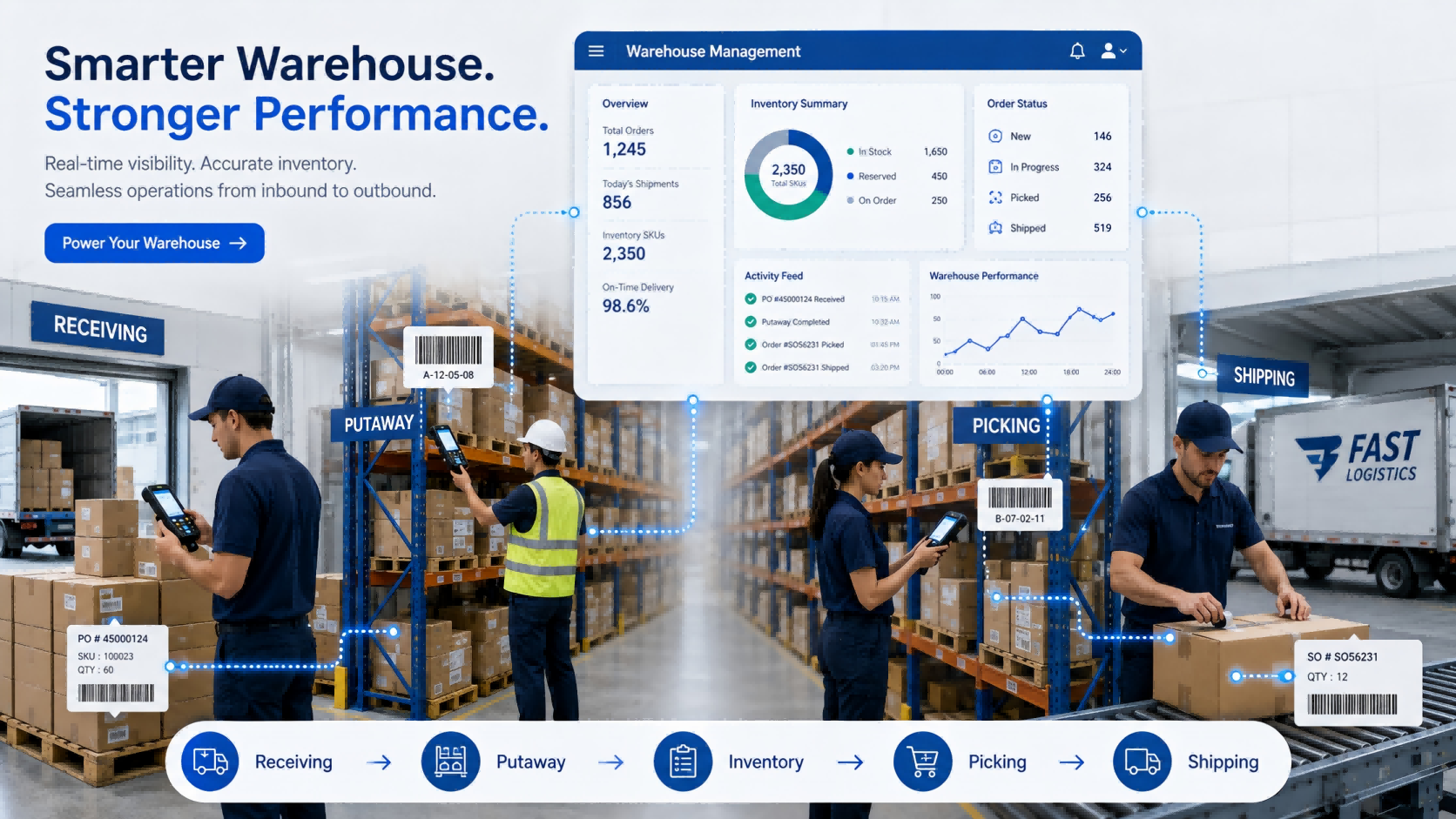
    Choosing warehouse management software can look simple at first. Most systems claim to support receiving, inventory, picking, and shipping. On a feature comparison sheet, they often look very similar. The differences usually appear after people start using them. Can warehouse workers receive goods directly on a handheld device? Can they find the correct bin without asking an experienced employee? Does inventory update immediately after picking? What happens when the physical quantity does not match the system? Can the WMS exchange orders with the ERP without someone entering the same information twice? These are the questions that matter in daily warehouse operations. This guide explains how to evaluate warehouse management software around the actual movement of goods—from inbound receiving and putaway to picking, shipping, inventory counting, and system integration.     Quick Answer: How Should You Choose a WMS?   A suitable warehouse management system should match three things: Your warehouse process How goods are received, stored, picked, shipped, and counted. Your operating volume SKU quantity, daily orders, warehouse locations, workers, and inventory frequency. Your required level of automation Manual entry, barcode scanning, handheld PDA, RFID, or automatic identification. For many small and medium warehouses, a practical starting point can be: WMS + Barcode + Handheld PDA + Printer RFID or more advanced automation can be introduced where the workload justifies it. The goal is not to buy the WMS with the most functions. It is to reduce the manual steps that are creating errors, delays, or poor inventory visibility today.   1. Start With the Warehouse Problem, Not the Software   Before watching a WMS demonstration, walk through one real inbound order and one real outbound order. For inbound: Purchase Order → Receiving → Inspection → Putaway → Inventory Update For outbound: Sales Order → Picking → Verification → Packing → Shipping → Inventory Deduction Then identify where employees still depend on: Paper Excel Manual quantity entry Memory Repeated checking Verbal communication Separate systems Those points should become your WMS requirements.   A Simple Example Imagine a warehouse receives 50 cartons. The operator checks the purchase order on a computer, writes the received quantity on paper, moves the cartons to a rack, and someone updates Excel later. There are already several places where the physical inventory and digital record can become different. A better workflow might be: Open Receiving Task → Scan Product → Confirm Quantity → Scan Bin → Complete Putaway The transaction is recorded while the warehouse worker is doing the work. That difference matters more than another ten dashboard charts.   From FYJ Project Experience One thing we often notice during early project discussions is that customers describe the problem as: “Our inventory is inaccurate.” Once the process is mapped, the problem often starts earlier. Goods may have been received without verification, moved without recording the new location, or shipped before the transaction was confirmed. Inventory accuracy is usually the result of the entire workflow—not an isolated software function.   2. Make Sure Inbound Operations Create Reliable Inventory Data   Inbound is where the inventory record begins. If the wrong quantity enters the system, everything afterward becomes harder. Depending on the business, receiving may need to capture: Purchase order Supplier SKU Received quantity Batch or lot Production or expiry date Inspection result Storage location Not every warehouse needs every field. A hardware distributor may care more about model and serial number. A food warehouse may care more about batch and expiry dates. A manufacturing warehouse may need material batches and production traceability. That is why generic feature lists can be misleading.   What to Ask During a WMS Demo Instead of asking: “Do you support inbound management?” Give the supplier a real exception: “One purchase order contains 20 SKUs. Two arrive short, one batch fails inspection, and the remaining goods need to be stored in three locations. Show us how the system handles it.” A live workflow usually tells you more than a Yes/No feature table.   3. Test Whether Workers Can Find Goods Without Relying on Experience   A warehouse can have the correct stock quantity and still waste time looking for goods. That usually happens when location management is weak. A practical WMS should connect inventory with physical locations such as: Warehouse → Zone → Rack → Shelf → Bin For many operations, the process can stay simple: Scan Item → Scan Bin → Confirm Putaway During picking: Open Task → Go to Bin → Scan Item → Confirm Quantity This reduces dependence on experienced employees who simply “know where everything is.”   Do You Need Automatic Putaway Rules? Large or complex warehouses may benefit from rules based on product category, capacity, picking frequency, or storage restrictions. Smaller warehouses may not. If your current problem is simply that goods are frequently placed in the wrong location or cannot be found quickly, solve that first. Complexity should follow the business need.   4. Decide How Workers Will Interact With the WMS   A WMS can have excellent software functions, but if warehouse employees still need to return to a desktop after every task, much of the manual gap remains. Ask where each transaction should happen.   Desktop Operations Usually suitable for: Order management Approval Reports Master data Management   Warehouse-Floor Operations A handheld PDA can support: Receiving Putaway Location transfer Picking Inventory counting Shipping verification The transaction is recorded while the operator is physically handling the goods. That reduces the gap between: What happened in the warehouse and What the system says happened.   FYJ Configuration Principle For many warehouse projects, we do not start by asking how many handheld devices the customer wants. We first look at: How many operators work at the same time? Which operations actually require scanning? Which areas can share devices? How often is inventory counted? Only then does it make sense to determine the hardware quantity. Buying devices before mapping the workflow can leave some units unused while other operators still wait for equipment.   5. Barcode or RFID? Choose Based on the Workload   RFID can improve warehouse automation, but it should not automatically be the starting point for every project. For many operations, barcode remains practical.   Barcode Works Well When Goods can be scanned individually Order volume is manageable Item-by-item verification is required The warehouse wants a simpler deployment Budget control is important   A typical process is: Scan Product → Scan Location → Confirm Quantity   RFID Becomes More Useful When Inventory volume is high Counting takes too much time Multiple tagged items need to be identified quickly Goods move through defined inbound or outbound points A higher level of automatic identification is required A better question than: “Should we use barcode or RFID?” is: “Which warehouse process has become too slow for one-by-one scanning?” That usually makes the decision much clearer. A WMS that supports both also gives the business room to start with barcode and introduce RFID later in selected processes.   6. Pay Special Attention to Picking and Shipping   Inbound errors affect inventory accuracy. Outbound errors reach the customer. That makes picking one of the most important workflows to test. A warehouse worker should be able to see: What to pick Where to pick it How much to pick The system should then verify what actually leaves the warehouse. A practical outbound process may look like: Sales Order ↓ Picking Task ↓ Bin Location ↓ Product Verification ↓ Quantity Confirmation ↓ Packing ↓ Shipping Confirmation Higher-volume operations may also need: Batch picking Wave picking Picking priority Replenishment Partial picking Shortage handling Do not select these functions simply because they sound advanced. Select them because the order volume requires them.   Real FYJ Project Experience: 500 Orders a Day and 3,000 SKUs In one warehouse management project in Thailand, the operation handled around 500 orders per day and approximately 3,000 SKUs. Before the new system was introduced, inventory accuracy was around 92%, picking errors were about 3%, and paper-based picking meant warehouse employees spent considerable time walking between locations. The project introduced digital inventory management, replenishment alerts, ABC inventory management, multi-warehouse control, and wave picking. After implementation: Inventory accuracy increased from 92% to 99.5% Picking errors decreased from 3% to 0.5% Warehouse walking distance was reduced by about 40% Inventory turnover improved from approximately 75 days to 45 days Daily closing could be completed in less than 10 minutes The result did not come from one individual software feature. Inventory records, storage locations, picking tasks, and daily warehouse operations were connected into the same workflow. This is why we recommend comparing WMS systems by process rather than by feature quantity.   7. Choose the Inventory Controls Your Warehouse Actually Needs   Once inbound and outbound workflows are clear, evaluate the inventory rules that affect daily operations. Requirement When It Matters Bin Location Management Workers need to know exactly where goods are stored Batch / Lot Management Products require traceability Expiry Management Goods have shelf-life requirements FIFO / FEFO Goods must leave in a defined sequence Multi-Warehouse Management Inventory is distributed across locations Cycle Counting Selected stock needs regular verification Replenishment Alerts Stock availability affects orders or production   You may not need all of them. Ask:“Which inventory rules affect our actual warehouse decisions every day?” That keeps the first deployment easier to manage.   Real FYJ Project Experience: Managing Spare Parts and Assets in One Operation Another project involved a machinery-related business that needed to manage both fixed assets and spare-parts inventory. This type of operation creates a different challenge from a conventional finished-goods warehouse. Some items are long-term equipment assets. Others are spare parts that are repeatedly received, stored, issued, and replenished. Treating everything as the same type of inventory makes records difficult to manage. The project therefore required the management process to distinguish between different item types while still giving users a clearer view of what was available and where it was located. The lesson is useful when choosing a WMS: Do not assume every item in the warehouse follows the same lifecycle. Before selecting software, identify whether you are managing finished goods, raw materials, spare parts, tools, consumables, equipment—or a combination of them. That classification can affect the software structure far more than buyers initially expect.   8. Clarify ERP Integration and Deployment Early   These two topics often appear late in software discussions, but they can change the project significantly. ERP Integration If an ERP already manages purchasing, sales, finance, or product master data, decide which system owns each transaction. A typical flow may be: ERP Purchase Order → WMS Receiving → WMS Inventory → ERP Synchronization For outbound: ERP Sales Order → WMS Picking & Shipping → Shipment Confirmation → ERP Update   Ask early: Where are SKUs created? Where are purchase and sales orders created? Which system owns inventory? Is API integration available? Does synchronization need to be real time? Without clear ownership, employees may end up entering the same transaction in both systems.   SaaS or Local Deployment SaaS may make sense when the business wants faster rollout, remote access, multi-site use, and lower local IT requirements. Local deployment may be required when the warehouse operates inside a controlled network or company policy requires data to remain on internal servers. Ask practical questions: What happens if the internet goes down? Who maintains the server? How is data backed up? Can several warehouses use the same system? How are software updates handled? The answers matter more than whether the product is labeled “cloud” or “on-premise.”   9. Compare WMS Suppliers With Real Scenarios   After several demonstrations, most WMS feature lists begin to look the same. A better method is to give every supplier the same warehouse scenarios.   Scenario A — Inbound A purchase order contains 10 SKUs. One arrives short. One needs inspection. The remaining goods go to several locations. Show the complete workflow.   Scenario B — Outbound A customer order contains 15 SKUs. One picking location does not have enough stock. Show how the system handles picking, shortage, verification, and shipment.   Scenario C — Inventory The physical quantity differs from the system. Show: Count → Difference → Review → Approval → Adjustment Now you are comparing how systems handle your actual work—not presentation slides.   WMS Selection Matrix     Your Situation Capability to Prioritize Manual receiving causes errors PDA receiving + barcode verification Workers struggle to find goods Bin location management Frequent picking mistakes Guided picking + scan verification Inventory differs from physical stock Real-time transactions + cycle counting Thousands of items need frequent counting Consider RFID Several warehouses share stock Multi-warehouse management Batch-sensitive products Batch/lot + FIFO/FEFO Existing ERP must remain API / ERP integration Limited internal IT resources Consider SaaS Controlled internal network Evaluate local deployment   This is a starting point, not a universal configuration.   Questions to Ask Before Choosing a WMS Supplier   Before signing a contract, ask: Can the system support our real inbound and outbound workflow? Can workers operate directly with handheld PDAs? Does inventory update immediately after transactions? How are warehouse locations managed? How does the system handle shortages and picking mistakes? Does it support barcode and RFID where required? Can it manage batch, expiry, FIFO, or FEFO? Can several warehouses share inventory information? Can it integrate with our ERP? Is SaaS or local deployment available? Who handles implementation and training? What happens when our process changes later? If the answer is only: “Yes, we support it.” ask for a live demonstration.   What Does a Practical WMS Setup Look Like?   For many small and medium warehouses, the first-stage configuration may simply be: Warehouse Management Software Handheld PDA Barcode Labels Barcode Printer This can already cover: Receiving → Putaway → Inventory → Picking → Shipping → Stock Counting Additional technologies can be introduced later. RFID when bulk identification becomes valuable. Fixed RFID Readers when inbound or outbound identification needs more automation. Multi-Warehouse Functions when operations expand. ERP Integration when duplicate data entry becomes a problem. The WMS should be able to grow with the operation without forcing unnecessary complexity into the first deployment.   How FYJ Approaches Warehouse Management Projects   FYJ combines warehouse management software with barcode, RFID, and mobile data collection hardware. Depending on the warehouse process, a project may include: Warehouse management software Handheld PDA Barcode scanner Barcode printer Barcode labels RFID handheld reader RFID tags Fixed RFID readers Our starting point is normally the workflow. Where does the inventory difference come from? Which warehouse operation consumes the most time? Where are workers repeatedly checking information? Which transactions still depend on paper or Excel? Once those questions are clear, it becomes easier to determine which software functions and hardware are actually required. The objective is not to digitize every possible warehouse process. It is to improve the processes where identification, workflow control, and real-time data can make a practical difference.   Frequently Asked Questions   What should I look for when choosing warehouse management software? Start with receiving, putaway, location management, picking, shipping, and inventory counting. Then evaluate PDA support, barcode or RFID requirements, integration, multi-warehouse management, and deployment method. What is the best WMS for a small warehouse? A smaller warehouse usually benefits more from a simple system covering core inbound, outbound, location, and inventory processes than from a complex platform with many unused functions. Does a WMS need handheld PDA support? If employees perform transactions while receiving, storing, picking, or counting goods, handheld support can reduce delayed and duplicate data entry. Should a warehouse use barcode or RFID? Barcode is often sufficient for one-by-one identification and standard warehouse operations. RFID becomes more attractive when frequent bulk identification or greater automation is required. Can WMS software integrate with ERP? Yes, if suitable interfaces are available. Before implementation, define which system owns orders, product data, inventory records, and transaction updates. Should I choose SaaS WMS or local deployment? Choose according to network conditions, internal IT resources, security requirements, multi-site needs, and maintenance capabilities. How should I compare WMS suppliers? Give each supplier the same real warehouse scenarios and ask them to demonstrate the complete workflow instead of comparing only feature lists.     Conclusion   Choosing warehouse management software becomes much easier when you stop comparing systems feature by feature and start comparing how they handle real warehouse work. Begin with the points where errors and manual work happen today: Receiving → Putaway → Inventory → Picking → Shipping Then decide what the warehouse really needs: Barcode or RFID? Desktop or handheld? Single warehouse or multiple warehouses? SaaS or local deployment? Standalone WMS or ERP integration? A good WMS should make daily operations easier to control and easier for employees to execute. If a system looks powerful in a demonstration but forces warehouse teams to create workarounds after deployment, it is probably not the right system. FYJ provides integrated warehouse management solutions combining WMS software, barcode, RFID, handheld PDAs, printers, and identification hardware. For companies evaluating a new warehouse system, the best starting point is usually a real inbound and outbound workflow—not a long software feature list.
    Read More

  • Case Study: How a Logistics Company Reduced Errors & Increased Throughput With RFID / AIDC Deployment
    Case Study: How a Logistics Company Reduced Errors & Increased Throughput With RFID / AIDC Deployment
    Mar 11, 2026
    In today's fast-paced supply chain environment, logistics efficiency directly determines a company's competitiveness. However, traditional manual scanning and data entry methods often result in high error rates and inefficiencies that become critical growth bottlenecks.Today, we'll take an in-depth look at how "Swift Logistics," a mid-sized logistics company we served, successfully transformed its operations by deploying RFID (Radio Frequency Identification) and AIDC (Automatic Identification and Data Capture) technologies. Client Background: Growing Pains Swift Logistics is a mid-sized company specializing in warehousing and distribution for e-commerce businesses. Handling approximately 10,000 orders daily across a 50,000-square-meter warehouse with over 50,000 SKUs, they were facing the typical headaches of a rapidly growing logistics operation when we first met them:1. High Error Rates: During the previous Double 11 shopping festival, inexperienced temporary workers struggled with outdated pda scanners, causing misshipment rates to spike to 1.2%-resulting in over 50 customer complaints in a single day. Even during normal operations, manual barcode scanning with warehouse barcode scanner devices frequently led to missed or incorrect scans, with inventory accuracy hovering around 94%. 2. Throughput Bottlenecks: Processing tens of thousands of packages daily required employees to manually aim and scan each barcode with handheld scanner devices, severely slowing down sorting and receiving processes. A 9.6-meter truck required 40 minutes of manual counting after unloading, causing drivers to wait in long queues and creating frequent congestion at the loading dock.3. Soaring Labor Costs: To handle peak seasons, the company had to hire lots of temporary workers, but training costs were high, and their lack of experience actually compounded the error problem. Entry-level scanning and verification positions were consuming an unsustainable portion of the labor budget.   Our Solution: Deploying RFID/AIDC TechnologyAfter in-depth discussions with Swift Logistics' IT and operations teams—and multiple on-site tests-they decided to move beyond traditional barcode systems and fully implement a solution based on UHF RFID technology. One key factor in their decision was the technology's physical capability to read over 300 tags per second. This meant that as a fully loaded pallet passed through a portal at normal speed, the system would have a full 3-second reading window to ensure data integrity—something a traditional barcode scanner could never achieve. 1. Transforming the Receiving ProcessIncoming goods no longer required piece-by-piece manual scanning. After applying RFID tags to product packaging, workers simply pushed carts equipped with RFID readers through the receiving portal. The system automatically read information from hundreds of items on entire pallets within 3 seconds, with data uploaded directly to the WMS—truly "invisible" receiving.Results: Truck unloading and counting time dropped from 40 minutes to just 5 minutes per 9.6-meter vehicle. Dock turnover efficiency improved by 80%, and drivers started commenting, "Delivering to Swift used to mean waiting forever. Now we're in and out." 2. Optimizing the Sorting ProcessOn the sorting line, we installed tunnel-style RFID scanners. As packages sped by on conveyors, the readers instantly captured all tag information and automatically verified it against orders. Any missorted item triggered an immediate alarm and visual indicator.Results: Manual sorting handled only 60-80 items per person per hour. The RFID tunnel processed over 600 items per hour—a 3-5x improvement in labor efficiency. Longtime sorters told us, "I used to go home with sore arms every day. Now I just monitor exceptions. It's so much easier." 3. Achieving Accurate Inventory CountsPreviously, physical counts required shutting down operations or pulling in extra staff. Two people would spend 8-12 hours scanning racks piece by piece with handheld computer scanner devices. Now, a single worker walks through the warehouse with one of our rugged handheld terminals and completes a full inventory count in 20-30 minutes, with near-perfect accuracy. Results: Inventory time decreased by 95%-a 20x efficiency improvement. More importantly, this newfound efficiency freed up working capital. Previously, Swift only dared to do full counts four times a year, resulting in approximately $2 million (RMB) tied up in excess safety stock. With weekly cycle counts now possible, inventory turnover increased from four to eight times annually, releasing about $1 million in cash flow.   Measurable Results: Significant Performance ImprovementsThree months after system deployment, Swift Logistics delivered impressive results. The following data comes from our project acceptance testing and the client's operational reports: 📉 97% Reduction in Shipping ErrorsError rates dropped from 7-8 misshipments per 1,000 packages (0.7%-0.8%) with manual barcode scanning to just 3-5 per 10,000 packages (<0.05%) with RFID. During their first Double 11 peak season after implementation—despite order volumes doubling-error rates remained below 0.03%. The entire event saw only three customer complaints related to damaged shipping labels. Inventory accuracy climbed from 92%-98% to over 99.8%, virtually eliminating misshipments. 🚀 150% Increase in ThroughputAverage package processing time (receiving to shipping) decreased by 70%. With no increase in headcount, daily order processing capacity grew from 10,000 to 25,000 orders. Receiving efficiency improved 10-20x, with full-pallet reads achieving 200-400 items per second. The system handled peak season surges flawlessly, achieving unprecedented throughput levels. 💰 30% Reduction in Operating CostsWhile the initial investment in RFID hardware and tags was significant, efficiency gains allowed Swift Logistics to reduce its reliance on temporary workers. Labor costs for entry-level scanning and verification positions decreased by 30-50%, and existing employees were redeployed to higher-value roles. Combined with improved inventory turnover and reduced working capital requirements, overall operating costs dropped substantially.   Client Perspective: Why They Chose This TechnologyDuring project acceptance, Swift Logistics' project manager shared their thinking: "We ultimately chose to partner with you on this UHF RFID solution because of its 'contactless, batch-read, real-time' capabilities. Barcode scanning requires the scanner to 'see' the barcode to read it. RFID doesn't. That means we could finally free our people from repetitive scanning and let data flow automatically."He added a real-world data point: "Before, we'd have 7-8 misshipments for every 1,000 packages we sent out—all requiring after-sale service. Now, after three consecutive months of tracking, our error rate has never exceeded 0.04%. We've truly achieved six-sigma quality. The project paid for itself in six months."   Technology in Action: The Devices That Made It PossibleSwift Logistics deployed a mix of fixed and mobile hardware to achieve these results: At receiving doors: Fixed RFID tag reader portals automatically captured inbound shipments On the sorting line: Tunnel-style RFID scanner systems verified orders at high speed For inventory: Staff used rugged mobile computers with integrated handheld RFID reader capabilities For spot checks: Supervisors carried android pda scanner devices that combined barcode and RFID reading In challenging environments: The team relied on industrial handheld computer units designed for warehouse conditions For cycle counts: Workers used rugged pda devices that could withstand drops and dust In freezer areas: Specialized rugged mobile computer models maintained performance in cold storage For receiving backup: Handheld RFID reader units provided flexibility for irregular items Throughout the facility: The combination of RFID tag reader portals and handheld computer scanner devices ensured complete visibility The hardware ecosystem included everything from fixed RFID card reader portals for pallet reads to android pda devices for managers needing real-time dashboard access. For the toughest conditions, industrial mobile computer and rugged handheld terminal models ensured reliability. The solution also incorporated HF RFID reader technology for specific applications requiring proximity reading.   Data Comparison: The Transformation at a GlanceTo help visualize the impact of RFID/AIDC technology, here's a comparison of Swift Logistics' key metrics before and after implementation: Metric Before (Traditional Barcode) After (RFID/AIDC) Improvement Receiving Efficiency 4-6 seconds/item 200-400 items/second 10-20x throughput increase Inventory Count Time 8-12 hours 20-30 minutes 95% reduction (20x faster) Shipping Error Rate 0.7%-0.8% <0.05% 97% reduction Data Accuracy 92%-98% >99.8% Near-perfect accuracy Sorting Efficiency 60-80 items/person/hour 600+ items/channel/hour 3-5x labor efficiency gain Truck Waiting Time 40 minutes/truck 5 minutes/truck 80% faster turnaround Labor Requirements Baseline 100% 30-50% reduction Significant cost savings   Conclusion: A Critical Step in Digital TransformationThe Swift Logistics case demonstrates that RFID/AIDC technology is no longer an unattainable high-tech luxury—it's a practical tool for companies to reduce costs and improve efficiency. Through its "contactless, batch-read, real-time" capabilities, it liberates human resources and enables data to flow automatically.For logistics companies facing similar challenges, embracing automatic identification technology isn't just about solving today's error and throughput problems-it's about building the intelligent, digital supply chain capabilities that will determine future competitiveness.If you'd like to learn how RFID/AIDC technology can help your business reduce costs and improve efficiency, we're here to help. We can provide a free on-site assessment and consultation based on your actual business scenario.
    Read More
  • How to Scale RFID / AIDC Deployment Across Multiple Warehouses or Sites — Best Practices for Growing Companies
    How to Scale RFID / AIDC Deployment Across Multiple Warehouses or Sites — Best Practices for Growing Companies
    Dec 18, 2025
    When a mid-sized e-commerce company expanded from 1 to 8 warehouses in two years, its inventory accuracy dropped from 99% to 76%, with annual shrinkage losses exceeding 2% of revenue. This is not an outlier—it’s the digital growing pain most scaling businesses face today. As operations expand, many organizations find that RFID (Radio-Frequency Identification) or AIDC (Automatic Identification and Data Capture) systems that succeeded in a single location fail to replicate elsewhere. Data silos emerge, standards diverge, and ROI diminishes with each new site. Scaling deployment across multiple facilities has become the critical differentiator between companies that leverage automation as a tactical tool and those that transform it into a strategic advantage.   01 The Scaling Paradox: Why Single-Site Success Doesn’t Replicate Moving from one warehouse to a multi-site operation exposes challenges far beyond technology. A well-known consumer brand in China successfully implemented RFID in its East China distribution center, but encountered unexpected barriers when replicating the system in North and South China facilities. Deployment timelines extended by 300%, data interoperability reached only 68%, and 12 critical variations emerged in operational protocols across sites. This was not a technology failure—but a breakdown in management systems at scale. Minor hardware discrepancies, network configuration differences, and variations in operator training—variables easily controlled in a single site—multiply exponentially across locations. Fundamentally, most initial deployments are driven by a project mindset: fixed timelines, limited budgets, defined scope. Scaling requires a product mindset: standardized, configurable, and maintainable solutions built for replication.   02 Five Pillars of a Repeatable Deployment Framework Successful multi-site scaling rests on five interdependent pillars. Standardized Hardware Architecture forms the physical foundation. Selecting devices supporting standard protocols (such as RAIN RFID or ISO/IEC 18000-63) and implementing a “core-edge” resilient architecture allows continuity during localized failures. One logistics company designed an RFID gateway cluster across 30 warehouses that automatically rerouted traffic during site outages, achieving 99.95% system-wide availability. Modular Software Platform serves as the nervous system. A microservices-based platform decouples reader management, data filtering, and business logic. Adding new warehouses becomes a configuration exercise—not a development project—reducing deployment time by 70%. Unified Data Model ensures interoperability. Establishing standardized data dictionaries, consistent tag encoding structures, and event definitions enables real-time visibility. A global manufacturer implemented uniform data models across 12 international factories, enabling real-time inventory comparison and optimized transfers. Phased Deployment Roadmap provides the execution plan. A structured “assess-pilot-regional rollout-full deployment” approach with clear milestones and decision gates prevents uncontrolled expansion. A leading electronics manufacturer adopted a wave deployment strategy, optimizing processes after every three sites, improving later deployment efficiency by 40%. Sustained Support System delivers long-term viability. Creating cross-site technical support teams, knowledge bases, and escalation protocols ensures remote facilities receive the same support quality as headquarters.   03 Execution Pathway: A Four-Phase Methodology Phase 1: Comprehensive Assessment & Architecture Design (1–2 months) Analyze variations in workflow, infrastructure, and workforce capabilities across sites. One apparel retailer discovered significant RFID read environment differences between urban fulfillment centers and suburban return hubs, then customized antenna placement—reducing accuracy variance from 15% to 2%. Phase 2: Pilot Optimization & Standard Creation (2–3 months) Conduct deep pilots at 1–2 representative sites, focusing not only on technical validation but on refining repeatable deployment processes and training materials. Document hours, common issues, and solutions to create a deployment playbook. Phase 3: Regional Rollout & Local Adaptation (3–6 months) Deploy in geographic or business-unit waves. Assign regional leads and provide “launch kits” from headquarters: standardized equipment lists, configuration templates, training videos, and checklists. Allow up to 20% localization to accommodate unique site requirements. Phase 4: Full Deployment & Continuous Improvement (6+ months) Establish ongoing optimization by regularly collecting performance data and improvement suggestions. One 3PL provider holds monthly cross-site operational reviews to share best practices, increasing average read rates from 97.2% to 99.1% within a year.   04 Navigating Pitfalls: Critical Decisions During Scale The greatest scaling challenges are often organizational, not technological. Here are three common traps and how to avoid them. Premature Technology Lock-in can be fatal. One company selected a specific hardware vendor during piloting, later unable to integrate more cost-effective alternatives. The solution: architect around open standards and isolate hardware dependencies through abstraction layers. One-Size-Fits-All Deployment ignores operational diversity. Applying identical RFID tag specifications to both cold-chain and ambient warehouses resulted in a 5x higher failure rate in freezing environments. The answer: develop 2–3 standardized configurations based on business scenario categorization. Underestimating Change Management triggers workforce resistance. A company deploying its seventh warehouse still relied on lessons learned from earlier sites but failed to systematize training, causing error rates to rebound. Implement a change impact assessment process to evaluate how adjustments affect all locations.   05 Case Study: Scaling from 3 to 30 Sites The journey of “Kangda Logistics,” a leading pharmaceutical distributor in China, offers instructive insights. After successful RFID deployment across three core warehouses in 2019, the company faced scaling to 30 nationwide sites. In Phase 1 (2020), they created a “standardized deployment kit” with pre-configured hardware, detailed installation guides, and video tutorials—reducing new site deployment from 8 weeks to 3 weeks. In Phase 2 (2021), a centralized monitoring platform provided real-time visibility into equipment status, read rates, and exceptions across all sites, enabling technical response within 15 minutes. In Phase 3 (2022–present), data-driven business rules were optimized—such as dynamically adjusting cycle counts based on risk levels. High-risk pharmaceuticals are counted weekly, low-risk monthly, maintaining safety standards while reducing counting labor by 35%. By the end of 2023, Kangda’s 30 sites achieved 99.2% average inventory accuracy, improved cross-warehouse transfer efficiency by 50%, and reduced annual counting costs by CNY 2.8 million. In Kangda Logistics’ year-end review, the most compelling visualization wasn’t a performance metric—but a deployment complexity curve. The first warehouse took 6 months, warehouses 2–3 each required 4 months, sites 4–10 averaged 6 weeks, and sites 11–30 stabilized at under 4 weeks—a clear indicator of scaling maturity.   For growth-stage companies, true competitive advantage lies not in a single successful pilot, but in systematizing the ability to replicate success. When technology deployment becomes predictable and repeatable, organizations can focus on innovation rather than repeatedly solving the same foundational challenges. In an era where logistics is service, the ability to synchronize digital operations across sites is no longer a technical option—it’s the threshold to the next stage of growth.   ------------------------------  
    Read More

leave a message

leave a message
Tell us about the product you are interested in, our team will reply to you within 2 hours with tailored resources like industry white papers, price quotes, or free trial access.
submit

home

products

WhatsApp

contact

Need Help? Chat with us

Start a Conversation

Hi! Click one of our members below to chat on