How to Integrate RFID with Your Existing WMS, ERP or POS System
Oct 27, 2026
At the 140th Canton Fair, one question came up again and again at the FYJ booth:
“We already have our own WMS, ERP or POS system. Can we add RFID without replacing it?”
In many cases, yes.
Some visitors already had warehouse management software. Others were using ERP platforms, retail POS systems or applications developed by their own technical teams.
They were not necessarily looking for another complete software platform.
They wanted to add RFID capabilities such as:
batch inventory counting
automatic inbound and outbound identification
RFID gate monitoring
faster item tracking
RFID-based loss prevention
automated data collection
This was not an isolated question.
During the fair, FYJ met customers asking specifically for RFID hardware with SDK support, businesses requesting API testing, retailers wanting to add RFID to existing retail software, and technical teams looking for hardware they could integrate into their own applications.
One manufacturing customer provided a particularly clear example.
The company was already managing metal sheet products with QR codes and had an existing software system. Instead of immediately replacing that software, the customer planned to first ask its software provider whether RFID functionality could be added.
If the existing software could support RFID, the company would evaluate RFID hardware integration.
If not, it would consider a separate RFID software solution.
This is often the right starting point.
Do not begin with:
“Which RFID reader should we buy?”
Begin with:
“What does our existing system already do, and where should RFID fit into the workflow?”
Quick Answer: Can RFID Be Added to an Existing WMS, ERP or POS?
Yes. In many projects, RFID can be added without replacing the existing business system.
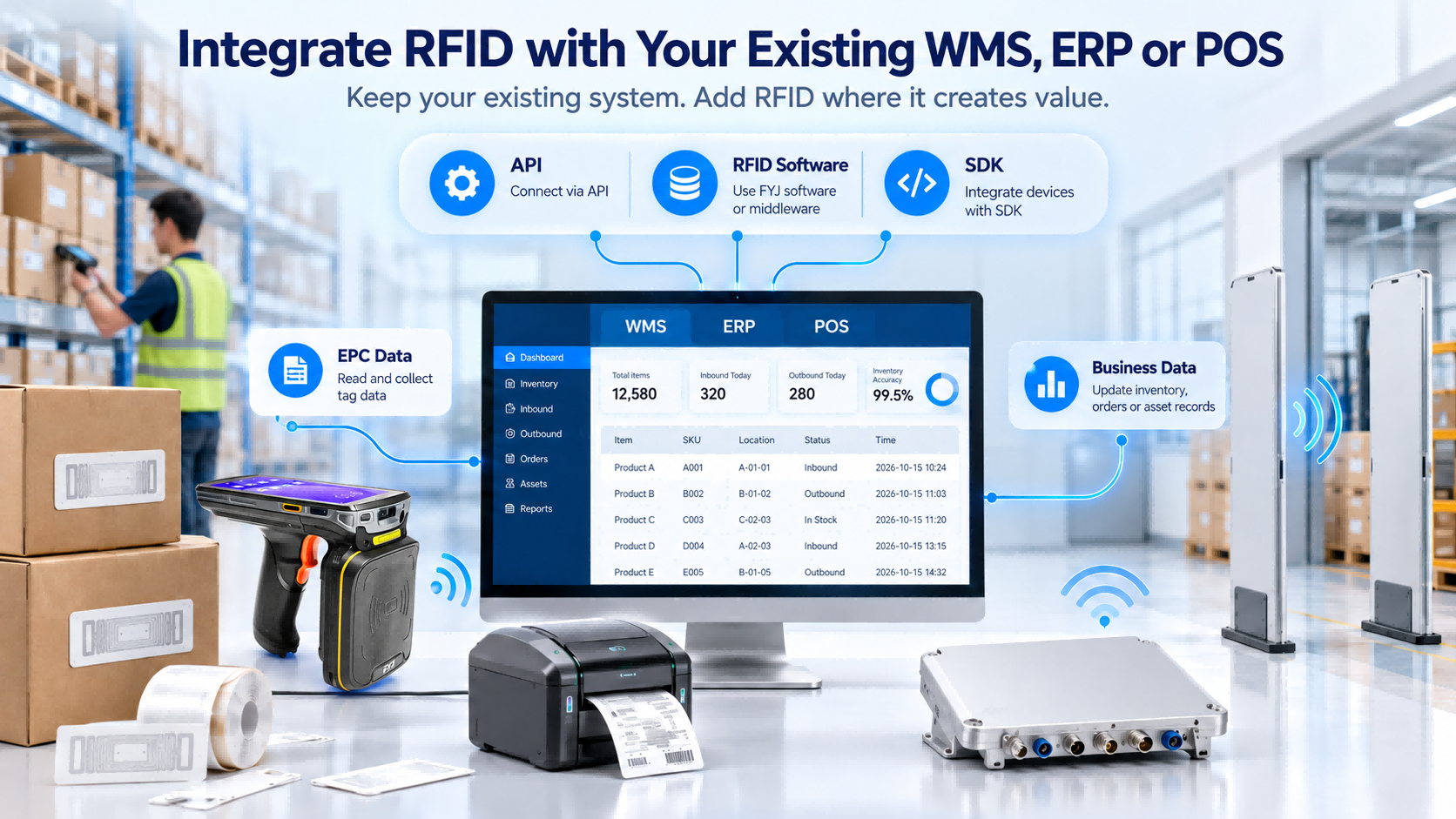
There are three common integration paths:
Connect your existing WMS, ERP or POS to RFID software through APIs
Keep your main business system and use separate software for selected RFID workflows
Integrate RFID hardware directly with your own software
The third option has an important requirement:
Your software must already support RFID, or your internal development team or software provider must develop the required RFID functions.
Buying an RFID reader does not automatically give an ERP, WMS or POS RFID capability.
The software must be able to:
receive RFID data
interpret EPC codes
associate EPCs with products or assets
handle duplicate reads
trigger inventory or movement events
update the appropriate business records
The right path depends on four things:
your existing software, internal development resources, target workflow and required level of integration.
Why Add RFID Instead of Replacing Your Existing System?
Most established businesses already have years of data and workflow logic inside their existing systems.
That may include:
SKUs and product records
warehouse locations
stock balances
customer and supplier data
sales and purchase orders
user permissions
reporting
approvals
accounting integrations
historical records
Replacing all of this simply to introduce RFID often creates unnecessary work.
Data may need to be migrated.
Employees may need retraining.
Existing interfaces may need to be rebuilt.
And in many projects, RFID is only needed at specific points such as:
stocktaking
receiving
shipping verification
warehouse entry and exit
retail checkout
loss prevention
fixed asset inventory
If your ERP already manages purchasing, finance and sales well, RFID does not need to replace those functions.
The goal is to insert RFID into the workflow where automatic identification creates value.
Three Ways to Add RFID to an Existing System
Option 1: Connect Your Existing System to RFID Software Through API Integration
This approach is usually suitable when the existing ERP, WMS or POS should remain the main business system.
RFID software manages the RFID-specific layer, including device communication, tag reading and RFID workflow logic.
The two systems exchange required data through APIs.
A simplified process may look like:
WMS / ERP / POS → RFID Software → RFID Reader → RFID Tag
and back:
RFID Tag → RFID Reader → RFID Software → WMS / ERP / POS
For example, a WMS sends a shipping order to the RFID application.
The RFID system reads the goods at the outbound point and compares the detected EPCs with the expected items.
Once verification is complete, the result is returned to the WMS.
Best Fit
API integration is usually a strong choice when:
your existing system works well
the system provides usable APIs
the existing system should remain the source of business data
RFID data needs to synchronize with current inventory or order records
your team does not want to develop RFID device control from scratch
At the Canton Fair, FYJ met customers specifically requesting test access and API interfaces while evaluating RFID warehouse solutions.
What Must Be Defined?
Before development begins, both sides should define:
system ownership of master data
API availability
required data fields
synchronization direction
EPC mapping rules
event triggers
error handling
duplicate handling
real-time vs scheduled synchronization
An API provides the connection.
The project still needs clear rules for what data moves, when it moves and what action follows.
Option 2: Keep Your Main System and Use RFID Software for Selected Workflows
Deep integration is not always necessary.
A company may keep its current ERP, WMS or POS while using a separate RFID system only for specific tasks.
Typical examples include:
RFID inventory counting
tag registration
asset inventory
RFID gate monitoring
goods movement records
item locating
RFID alarm management
The existing system continues to handle the core business process.
The RFID system handles the workflow where RFID adds value.
Example
A company already uses ERP for purchasing, sales and inventory records.
Its main problem is physical inventory.
Rather than replacing the ERP, the company introduces an RFID application for stocktaking.
Product data is imported or synchronized according to the project design, and RFID inventory results are then used to update or reconcile the main system.
Best Fit
This approach works well when:
the existing system has limited RFID capability
only one or two workflows need RFID
there is no internal RFID development team
deployment speed matters
the company wants to validate RFID before deeper integration
It also reduces the risk of rebuilding software functionality that already works.
Option 3: Integrate FYJ RFID Hardware Directly with Your Own Software
This route is most relevant to:
system integrators
software companies
businesses with internal development teams
companies whose current software already supports RFID
In this model, the customer keeps its own software and integrates FYJ RFID hardware into it.
But the condition is important:
The software must already support RFID, or the customer’s software provider or technical team must develop the RFID functions required for the project.
RFID hardware does not automatically become part of an existing application.
The software needs to understand both the device and the business event behind each read.
At the Canton Fair, FYJ met businesses that already had their own software and wanted hardware or SDK support. One software company had its own technical team and RFID capability but needed a broader RFID hardware offering rather than another standard software platform.
What Usually Needs to Be Developed?
Depending on the workflow, development may include:
RFID reader communication
device configuration
EPC data collection
tag filtering
EPC-to-SKU mapping
EPC-to-asset mapping
duplicate-read logic
inventory counting
inbound/outbound event logic
alarm rules
location updates
device status monitoring
user interface functions
A reader returning an EPC such as:
E280XXXXXXXXXXXX
does not tell the business system enough on its own.
The application needs to know that the EPC corresponds to something meaningful, such as:
EPC → SKU → Product → Warehouse Location
or:
EPC → Asset ID → Department → Responsible User
That business logic belongs in the software layer.
RFID Integration Decision Table
The table below gives a more practical way to choose among the three approaches.
Your Situation
API Integration
Separate RFID Software
Direct Hardware Integration
Existing ERP/WMS/POS already works well
Strong fit
Possible
Possible
Existing software has API support
Best fit
Possible
Depends on RFID support
Existing software does not support RFID
Possible through middleware
Strong fit
Requires development
You have no internal development team
Good fit
Best fit
Usually not recommended
You have your own technical team
Good fit
Possible
Strong fit
Your software already supports RFID
Possible
Usually unnecessary
Best fit
Only one workflow needs RFID
Possible
Strong fit
Possible
You want deep control over device behavior
Moderate
Moderate
Best fit
You want faster deployment
Moderate
Strong fit
Depends on development
You want maximum long-term flexibility
Good
Moderate
Strong fit
You want to keep your existing software
Yes
Yes
Yes
Development effort
Medium
Low–Medium
Medium–High
A Simple Rule
Choose API integration when your current software is strong and provides good interfaces.
Choose separate RFID software when you need RFID quickly but do not want to develop RFID functions internally.
Choose direct hardware integration when your software already supports RFID or your technical team can develop the RFID layer.
How RFID Data Actually Flows
One of the most common misunderstandings in RFID integration is assuming that the RFID reader directly updates the ERP.
Usually, there are several layers.
A simplified RFID data flow looks like this:
RFID Tag
↓
RFID Reader / PDA / RFID Gate
↓
Device SDK / Interface / RFID Software
↓
Business Logic
↓
API / Data Exchange Layer
↓
WMS / ERP / POS
The reverse direction can also happen.
For example:
ERP Shipping Order
↓
RFID Application
↓
Expected EPC List
↓
RFID Reader Detects Actual Tags
↓
Verification Result
↓
ERP Order Updated
This distinction matters because RFID integration is not only about transferring EPC numbers.
The system must turn tag reads into business events.
For example:
Tag detected at Door A
is only raw RFID data.
The business system may need to interpret it as:
Product X left Warehouse A at 14:32 under Shipping Order 10025.
That transformation is where RFID integration creates business value.
What RFID Hardware Might Be Required?
Software architecture comes first, but the workflow determines the hardware.
RFID Handheld PDA
Suitable for mobile operations such as:
stocktaking
asset inventory
item locating
receiving
picking
shipping checks
A handheld is often one of the simplest ways to introduce RFID because staff control where and when reading takes place.
RFID Printer
An RFID printer is required when labels need to be printed and encoded.
It is especially useful when each item needs a unique EPC associated with an existing SKU, barcode, part number or asset record.
Fixed RFID Reader
Fixed readers suit automatic identification at predefined locations, including:
conveyors
receiving stations
shipping stations
production lines
controlled passages
RFID Gate
RFID gates identify tagged goods passing through an entrance or exit.
The software must then determine the meaning of the event:
Inbound? Outbound? Authorized? Unexpected?
This is why successful RFID gate projects depend on both reading performance and business logic.
RFID Tags
Tag selection depends on:
product material
packaging
mounting position
required reading distance
temperature
metal surfaces
item size
movement conditions
For example, one customer evaluating RFID for cold-storage components needed to confirm whether the selected tag could withstand the transition from freezing conditions back to room temperature.
How Does an EPC Connect to Your Existing SKU or Barcode?
Most businesses already use identifiers such as:
SKU
barcode
GTIN
part number
serial number
asset ID
RFID introduces another identifier: the EPC stored in the RFID tag.
The system needs a defined relationship between the EPC and the existing business record.
For example:
EPC → SKU → Product
or:
EPC → Barcode → Product Record
or:
EPC → Asset ID → Asset Record
Without this relationship, the reader can successfully detect a tag while the business system still does not know what was actually identified.
This leads to an important distinction.
Device Integration
Can your software receive data from the RFID device?
Business Integration
Can your software understand what that data represents and use it correctly?
A technically successful connection is not enough if the business logic is missing.
What Should You Confirm Before Starting an RFID Integration Project?
Before selecting devices or asking developers to start coding, answer these questions:
What software are you currently using?
Does it already support RFID?
Does it provide APIs?
Do you have an internal development team or software provider?
Which workflow needs RFID?
What products or assets are being managed?
How are they identified today?
Does every item need a unique RFID tag?
Where should RFID reading happen?
What business event should a tag read create?
Should the result update the ERP/WMS/POS immediately?
Which RFID hardware is required?
Who will be responsible for software development and testing?
How will exceptions and failed reads be handled?
These answers usually determine the integration architecture before the final hardware model is selected.
Common RFID Integration Mistakes
1. Buying Hardware Before Confirming Software Compatibility
A high-performance RFID reader still creates problems if the software cannot communicate with it.
Confirm the integration architecture before ordering hardware.
2. Treating an SDK as a Complete RFID Solution
An SDK helps developers communicate with the device.
It does not automatically create:
inventory workflows
inbound/outbound logic
alarm rules
EPC mapping
reporting
These functions still need to exist in the application.
3. Ignoring EPC Mapping
RFID reads EPCs.
Your business manages products, SKUs, orders and assets.
The connection between them must be defined before deployment.
4. Using RFID Everywhere
Not every barcode process needs to be replaced.
Keep barcode where one-by-one scanning is already efficient.
Use RFID where batch identification, automation or faster inventory creates measurable value.
5. Testing Only the Reader
A proper RFID test should use:
real products
real packaging
actual RFID tags
realistic movement
actual reading positions
The important question is not:
“Can the reader detect the tag?”
It is:
“Can the system reliably identify the correct item at the correct point in the workflow?”
Real Questions We Heard at the Canton Fair
Many of the integration discussions at the FYJ booth came down to a few recurring questions.
“We already have our own software. Can we buy only the RFID hardware?”
Yes—provided the software already supports RFID or your developers can add the required functionality.
“Can RFID connect to our existing WMS or ERP?”
Often yes. The available API, required data fields and workflow need to be reviewed first.
“Do we have to replace our existing retail software?”
No. Depending on the current system, RFID may be integrated directly or handled through a separate RFID workflow.
“Can our developers integrate the hardware themselves?”
Yes, when the relevant SDK or device interface is available and the development team can build the required RFID functions.
“What if our current software does not support RFID?”
First ask the existing software provider whether RFID functionality can be added.
If that is not practical, a separate RFID software solution may be a better route.
These were not theoretical questions. Exhibition records included businesses with their own ERP systems, retail platforms, warehouse applications and internal development teams looking specifically for ways to add RFID without rebuilding everything from scratch.
FAQ
Can RFID be integrated with an existing WMS?
Yes.
If the WMS provides suitable interfaces, RFID data can be integrated directly or through RFID middleware/software.
If the WMS has no RFID capability, a separate RFID application can manage RFID-specific workflows while the WMS remains the main warehouse system.
Can an RFID reader connect directly to an ERP?
Only when the ERP already supports the RFID device or developers add the required integration.
Most standard ERP systems do not automatically interpret RFID reader data.
Do I always need an API?
No.APIs are mainly used to exchange data between software systems.
If RFID functionality is built directly into your own software, the application may communicate with the hardware through an SDK or another supported device interface.
What is the difference between an API and an SDK in RFID integration?
An API usually connects software systems and exchanges business data.
An SDK gives developers tools to communicate with hardware and build device-related functions.
Some RFID projects use both.
Can barcode and RFID work together?
Yes.Many businesses keep barcode for workflows where one-by-one scanning is efficient and add RFID only where batch reading or automated identification provides greater value.
Can an EPC be linked to our existing SKU or barcode?
Yes.A mapping relationship is created between the EPC and the existing SKU, barcode, part number or asset record.
The exact structure should be defined during system design.
Can FYJ RFID hardware work with any software?
Not automatically.
The software must already support RFID or be developed to communicate with the hardware through the appropriate SDK, protocol or device interface.
Compatibility should be confirmed before deployment.
What should we provide when asking for an RFID integration proposal?
Useful information includes:
existing software
API availability
internal development capability
current workflow
products or assets
SKU/barcode structure
warehouse or retail environment
required RFID functions
expected reading points
required hardware
The more clearly these are defined, the easier it is to choose the right integration path.
Final Takeaway
Adding RFID does not mean starting your software environment again from zero.
In many projects, the better approach is to keep the existing WMS, ERP or POS and introduce RFID only where it improves identification, inventory or automation.
The decision usually comes down to three paths:
Use API integration when your existing system works well and provides suitable interfaces.
Use separate RFID software when you need RFID functionality without building the RFID layer yourself.
Integrate RFID hardware directly when your software already supports RFID or your technical team can develop the required functions.
Before choosing a reader, define the workflow.
Before choosing an integration method, understand the software.
And before deployment, make sure RFID data can become meaningful business data.
The right RFID project is not built around the reader. It is built around the business process.
Read More


 en
en 


 IPv6 network supported