

Discover how to integrate PDA scanning software with ERP and WMS systems. Learn about inventory management apps, custom PDA application development, and offline barcode scanning solutions for seamless warehouse operations.
Introduction
In modern warehouse and supply chain management, efficiency depends on how well your systems communicate with each other. At the heart of this communication lies PDA scanning software—the technology that bridges frontline operations with your digital infrastructure.
However, implementing a scanning solution is only half the battle. The true value emerges when you successfully connect your PDA barcode scanner software with your Enterprise Resource Planning (ERP) and Warehouse Management Systems (WMS). Without seamless integration, you risk creating data silos, manual errors, and operational bottlenecks.
This comprehensive guide will walk you through everything you need to know about integration—from planning and execution to overcoming common challenges. Whether you're considering custom PDA application development or evaluating ready-made WMS integration software, you'll find actionable insights to drive your project forward.
Why Integration Matters: The Business Case
Integrating your Android PDA software with ERP and WMS systems delivers measurable business value across multiple dimensions:
1. Eliminate Costly Human Errors
Manual data entry is prone to mistakes. A single typo in a part number or quantity can trigger stock discrepancies, delayed shipments, and accounting errors. With PDA barcode scanner software, data is captured automatically at the source—delivering near-perfect accuracy.
2. Achieve Real-Time Inventory Visibility
When your inventory management app syncs instantly with your ERP and WMS, every scan updates inventory levels in real time. This visibility enables accurate demand forecasting, prevents stockouts, and supports confident sales commitments.
3. Boost Warehouse Productivity
Workers no longer need to memorize tasks or walk to fixed terminals. With tasks pushed directly to their handheld devices, they can complete receiving, putaway, picking, and counting cycles significantly faster—often reducing labor costs by 20–30%.
4. Enforce Standardized Processes
Integration allows you to embed your standard operating procedures (SOPs) directly into the workflow. Whether it's mandatory cycle counting or strict lot tracking, the system guides operators step by step, ensuring compliance without additional supervision.
5. Enable Data-Driven Decision Making
Real-time operational data feeds into your ERP and WMS dashboards, giving managers unprecedented visibility into productivity metrics, cycle times, and exception rates.
Key Components of a Successful Integration
Before diving into the technical implementation, it's important to understand the core components that make up a modern scanning and integration ecosystem.
| Component | Description |
| PDA scanning software | The application running on handheld devices that captures barcode data and guides operators through tasks |
| Inventory management app | The module responsible for tracking stock movements, quantities, and locations in real time |
| PDA barcode scanner software | The scanning engine that decodes 1D/2D barcodes, often with advanced features like batch scanning and image capture |
| Android PDA software | Applications optimized for Android-based rugged handheld devices, the most common platform in modern warehouses |
| WMS integration software | Middleware or API layers that facilitate communication between the PDA solution and your warehouse management system |
| Offline barcode scanning app | A critical feature that allows continued operation during network interruptions, with automatic sync once connectivity is restored |
Step-by-Step Integration Guide
Step 1: Define Your Integration Goals and Scope
Start by answering these foundational questions:
What business problems are you solving?
Inventory accuracy? Order fulfillment speed? Labor efficiency? Regulatory compliance?
Which processes will be covered?
Will you integrate receiving only, or the full cycle—receiving, putaway, picking, packing, shipping, cycle counting, and replenishment?
What systems will be involved?
Identify your ERP (e.g., SAP, Oracle, Microsoft Dynamics, NetSuite) and WMS. Document their data structures, APIs, and integration capabilities.
Who are the end users?
Internal employees or third-party logistics (3PL) teams? What is their technical proficiency?
A clear scope prevents scope creep and ensures your custom PDA application development efforts remain focused on delivering maximum ROI.

Step 2: Select the Right PDA Software Solution
Choosing the right software foundation is critical. Evaluate potential solutions against these criteria:
API-First Architecture
Look for WMS integration software that offers open, well-documented RESTful APIs. API-first design ensures flexibility for current integration needs and future system upgrades.
ERP and WMS Compatibility
Does the vendor have prebuilt connectors or proven integration experience with your specific ERP and WMS platforms? Request case studies or reference calls.
Offline Capabilities
Warehouse Wi-Fi coverage is rarely perfect. An offline barcode scanning app allows operations to continue uninterrupted during network outages, with data automatically syncing when connectivity resumes.
Customization Flexibility
If your workflows are unique, consider solutions that support custom PDA application development. This allows you to tailor screens, workflows, and validation rules to your exact requirements.
Android Optimization
Most modern rugged devices run on Android. Ensure your Android PDA software is optimized for industrial use—with large touch targets, glove-friendly interfaces, and support for enterprise-grade scanners.
Step 3: Design the Data Flow Architecture
A well-designed data flow ensures reliability and scalability. Here's a typical integration architecture:
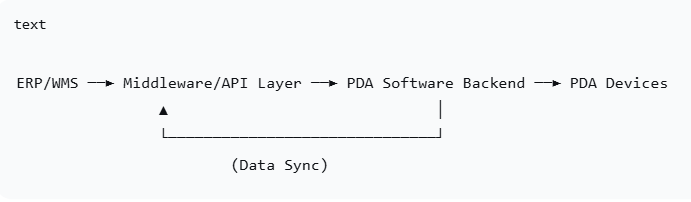
Data Flow Breakdown:
Task Dispatch (ERP/WMS → PDA)
The ERP or WMS pushes tasks—such as receiving orders, picking lists, or transfer orders—to the PDA software backend via API or database triggers.
Execution (PDA Device)
Operators receive tasks on their inventory management app. Each step is guided: scan location, scan item, enter quantity, confirm. Every action is timestamped and logged.
Data Return (PDA → ERP/WMS)
Upon task completion, the PDA software sends back actual data—quantities, lot numbers, serial numbers, operator IDs, and timestamps—to update the ERP and WMS in real time.
Exception Handling
When discrepancies occur (e.g., wrong item scanned), the system immediately flags the issue, preventing incorrect data from entering your core systems.
Step 4: Choose Your Integration Approach
There are three primary approaches to integration. Each has its trade-offs.
| Approach | Description | Best For | Pros | Cons |
| Middleware Integration | A dedicated integration layer handles communication between systems | Complex environments, multi-site operations, future flexibility | Loosely coupled, scalable, easier to maintain | Additional infrastructure cost |
| Direct API Integration | PDA software connects directly to ERP/WMS via APIs | Simpler environments, single system integration | Fast, no extra layers | Tighter coupling, upgrades may require rework |
| Database-Level Integration | Data exchanged via shared database tables | Legacy systems, quick proof-of-concept | Simple to implement | Security risks, data conflicts, not scalable |
Recommendation: For most organizations, middleware integration using purpose-built WMS integration software provides the best balance of flexibility, reliability, and long-term maintainability.
Step 5: Develop or Configure the PDA Application
At this stage, you'll build or configure the actual PDA scanning software that operators will use daily.
For Ready-Made Solutions:
Configure screens, workflows, and validation rules using the vendor's admin tools
Map data fields between the PDA app and your ERP/WMS
Configure offline sync policies
For Custom PDA Application Development:
Design intuitive, task-focused user interfaces optimized for rugged Android devices
Implement business logic that mirrors your exact processes
Build robust offline capabilities with local database storage and sync queues
Integrate with device hardware (scanners, cameras, printers) for maximum efficiency
Step 6: Test Thoroughly Before Go-Live
Comprehensive testing prevents disruptions and ensures user adoption. Your testing plan should include:
Functional Testing
Verify every transaction type (receiving, picking, counting, etc.)
Confirm data accuracy between PDA, middleware, and ERP/WMS
Test exception scenarios (wrong barcode, quantity mismatch, location errors)
Load and Stress Testing
Simulate peak-hour transaction volumes
Test concurrent user scenarios
Monitor system response times and resource utilization
Offline Testing
Disconnect devices from network and verify offline operation
Confirm automatic sync when connectivity returns
Test conflict resolution when offline changes conflict with online updates
User Acceptance Testing (UAT)
Have actual warehouse staff test the system in a sandbox environment
Gather feedback on usability and workflow fit
Refine before full deployment
Step 7: Train Users and Deploy
Training is often the most underestimated phase of integration projects. Even the most sophisticated inventory management app will fail if operators don't use it correctly.
Best Practices for Training:
Role-based training – Receivers, pickers, and supervisors have different workflows
Hands-on sessions – Let users practice with real devices and test barcodes
Quick-reference guides – Create one-page cheat sheets for each role
Super-user program – Identify power users who can assist colleagues post-launch
Deployment Approach:
Consider a phased rollout—start with one process (e.g., receiving) in one location, validate success, then expand. This minimizes risk and allows you to refine based on real-world feedback.
Common Integration Challenges and Solutions
Even with careful planning, integration projects encounter hurdles. Here's how to address the most common ones.
| Challenge | Solution |
| Unstable Wi-Fi coverage | Deploy industrial-grade access points; choose Android PDA software with robust offline caching and automatic sync |
| Inconsistent master data | Perform data cleansing before integration—standardize item codes, location codes, and vendor codes across all systems |
| Vendor integration complexity | Select WMS integration software vendors who provide dedicated integration support and prebuilt connectors for your ERP/WMS |
| User resistance | Involve operators early in the selection and testing process; emphasize how the system makes their jobs easier |
| Performance degradation | Optimize API calls, implement pagination, and consider asynchronous processing for non-real-time operations |
| Customization limitations | If off-the-shelf solutions fall short, invest in custom PDA application development to achieve exact workflow requirements |
Future-Proofing Your Integration
Technology evolves rapidly. To ensure your integration remains valuable for years to come, consider these forward-looking strategies:
1. Embrace API-First Architecture
Solutions built on open APIs are easier to connect, upgrade, and extend. Avoid proprietary, closed systems that lock you in.
2. Plan for Scalability
Design your integration to handle 2–3x your current transaction volume. As your business grows, your systems should scale seamlessly.
3. Consider Mobile Device Management (MDM)
As you deploy more Android PDA software across your operations, MDM solutions help you manage devices remotely—pushing updates, enforcing security policies, and monitoring device health.
4. Explore Advanced Capabilities
Modern PDA barcode scanner software can do more than read barcodes. Consider:
Vision picking – Camera-based item recognition
Voice integration – Hands-free operation for certain workflows
IoT sensor integration – Temperature, humidity, or vibration monitoring
5. Maintain Documentation
Keep your integration architecture, API specifications, and data mapping documents updated. This pays dividends when onboarding new team members or troubleshooting issues.
Measuring Success: Key Performance Indicators
How do you know your integration project is successful? Track these KPIs before and after implementation:
| KPI | Before Integration | After Integration |
| Inventory accuracy | 85–92% | 99%+ |
| Order picking accuracy | 90–95% | 99.5%+ |
| Receiving processing time | 15–30 min per PO | 5–10 min per PO |
| Cycle count time | 4–8 hours | 1–2 hours |
| Data entry errors | 1–3% of transactions | <0.1% |
| Labor productivity | Baseline | +20–40% |
Conclusion
Integrating PDA scanning software with your ERP and WMS systems is one of the highest-impact investments you can make in warehouse and supply chain operations. It eliminates manual errors, delivers real-time visibility, empowers your workforce, and creates a foundation for continuous improvement.
Whether you choose a ready-made solution, invest in custom PDA application development, or deploy purpose-built WMS integration software, the key principles remain the same:
1.Start with clear business goals
2.Select open, flexible technology
3.Design for reliability and offline resilience
4.Train users thoroughly
5.Measure results and iterate
When your warehouse team can complete tasks seamlessly using Android PDA software—while inventory levels update instantly in your ERP—you've achieved the true promise of digital transformation: action and insight in perfect sync.
Frequently Asked Questions
Q: Can I integrate PDA scanning software with my existing ERP without replacing it?
A: Yes. Most modern PDA scanning software solutions are designed to integrate with existing ERPs via APIs or middleware, preserving your current system investments.
Q: What if my warehouse has poor Wi-Fi coverage?
A: Choose an offline barcode scanning app that stores data locally on the device and syncs automatically when connectivity is restored. This ensures continuous operations.
Q: Is custom PDA application development expensive?
A: Custom development typically requires a higher upfront investment but delivers exactly the workflows you need. For many organizations with unique processes, the ROI justifies the cost.
Q: How long does a typical integration project take?
A: A straightforward integration with off-the-shelf WMS integration software may take 4–8 weeks. Complex custom PDA application development projects can take 3–6 months depending on scope.
Q: Do I need to upgrade my ERP before integration?
A: Not necessarily. Most integration projects work with existing ERP versions. However, ensuring your ERP has modern API capabilities simplifies the process.
Ready to Integrate?
If you're planning an integration project or looking to upgrade your current inventory management app, the right partner can make all the difference. Look for vendors who offer:
1.Proven experience with your ERP and WMS platforms
2.Open, API-first PDA scanning software
3.Robust offline barcode scanning app capabilities
4.Expertise in custom PDA application development when needed
5.Comprehensive training and ongoing support
Have questions about your specific integration scenario? Share your challenges in the comments below, and our team will help you find the right approach.

-----------------------------
Hi! Click one of our members below to chat on
 en
en 


 IPv6 network supported